Wix Conversion Tracking: GA4, Google Ads & Meta CAPI Done Right
This is for Wix site and Wix Stores owners who run Google or Meta ads and can't trust the numbers they see. Wix's built-in marketing integrations are easy to switch on, but they are hard to customise and easy to duplicate with manual code. I decide what Wix should handle natively, what GTM should handle, and add server-side events where they make the data more complete.
Wix · Ecommerce & lead gen
Wix Stores purchases sent with order value and a single order ID
Wix Forms and booking leads tracked as real conversions
No double counting between Wix integrations and custom code
Server-side Meta CAPI on your own tracking subdomain
Proper Wix tracking means choosing one sender per event: Wix's built-in Marketing Integrations or GTM, not both. GTM connects through the Wix dashboard and reads the events Wix pushes for Stores, Bookings and forms. Purchases go to GA4, Google Ads and Meta with value and order ID, and server-side GTM adds a Conversions API copy with deduplication.
Tracking flow
How tracking works on Wix
The events I set up on Wix, and where each one is sent.
03Google Tag ManagerOne web container for all tags
04Server-side GTMOn your own subdomain
Sent to
GA4Ecommerce and lead events
Google AdsConversions
MetaPixel + Conversions API
Why it breaks
Why Wix tracking goes wrong
Built-in integrations and custom code overlap
Wix lets you connect GA4, Google Ads, the Meta Pixel and GTM from Marketing Integrations, and also paste code in Settings > Custom Code. Sites often end up with the same pixel installed both ways, so every purchase and lead is counted twice.
Wix events aren't in GA4 ecommerce format
Wix pushes its own store events to the dataLayer when GTM is connected, but the names and structure don't match GA4's recommended ecommerce schema. Without remapping, GA4 gets purchases with missing items or no value.
Checkout is a closed Wix page
You can't freely edit the Wix checkout or drop scripts into it. Tracking checkout steps and the thank-you page has to rely on the events Wix exposes rather than your own page code.
Forms and bookings don't redirect
Wix Forms usually show a success message instead of loading a new page, and Wix Bookings runs its own flow. A thank-you page trigger never fires, and button clicks count failed attempts as leads.
Browser-only data loss
Even when the built-in Meta integration is working, ad blockers, Safari limits and declined consent mean a share of conversions never reach Meta or Google from the browser.
What I set up
My Wix tracking setup
Integration clean-up & GTM
Audit of Marketing Integrations, Custom Code and embedded scripts
GTM connected through the Wix dashboard
Duplicate pixels and old tags removed
A clear decision on which events Wix sends and which GTM sends
Rules that keep editor preview and test traffic out of reports
Wix Stores ecommerce
Wix store events remapped to GA4 view_item, add_to_cart, begin_checkout and purchase
Purchase with order ID, value, currency and items
Google Ads purchase conversion with value and enhanced conversions
Meta Pixel purchase with a shared event ID
Leads & bookings
Wix Forms submissions tracked on success, not on click
Wix Bookings appointments tracked as a separate conversion
Click tracking for phone, email and WhatsApp links
Enhanced conversions for leads in Google Ads
Server-side & testing
Server-side GTM on Stape or Google Cloud with a custom tracking subdomain
Meta Conversions API with hashed email and phone, deduplicated against the Pixel
Consent banner connected to Consent Mode v2
Test orders and form fills checked in Tag Assistant, GA4 DebugView and Events Manager
Event map
Events I track on Wix
Event
When it fires
Sent to
view_item / ViewContent
Wix Stores product page viewed
GA4, Meta Pixel + CAPI
add_to_cart / AddToCart
Product added to cart
GA4, Meta Pixel + CAPI
begin_checkout / InitiateCheckout
Checkout started from the cart
GA4, Meta Pixel + CAPI
purchase / Purchase
Wix reports the order as completed (thank-you page)
GA4, Google Ads, Meta Pixel + CAPI
generate_lead / Lead
Wix Form shows its success message
GA4, Google Ads, Meta Pixel + CAPI
book_appointment / Schedule
Wix Bookings appointment confirmed
GA4, Google Ads, Meta
contact_click
Click on a tel:, mailto: or WhatsApp link
GA4, Google Ads
Process
How the setup works
01
Audit
I check every place tracking can live on Wix: Marketing Integrations, Custom Code, embeds and apps. Then I compare platform conversions with your Wix orders and form submissions.
02
Decide who sends what
We agree which events stay with Wix's native integrations and which move to GTM, so each event has exactly one sender per platform.
03
Build
I connect GTM, remap Wix store and form events to GA4 and ad platform events, and add server-side GTM for Meta CAPI.
04
Test on the live site
I place test orders and submit real forms on your published domain, and confirm each one is counted once in every platform.
05
Hand over
You get an event map and notes on what to check when you add apps or change your store setup.
Wix Marketing Integrations vs GTM
Wix's built-in integrations for Google and Meta are fine for a simple setup and need no code. Their limits show up when you need control: custom event names, extra parameters, conversion values for leads, or a single server-side pipeline for several platforms.
My usual approach is to connect GTM through the dashboard, which is how Wix recommends adding it rather than pasting the snippet into Custom Code. GTM then listens to the events Wix pushes and sends them on in the format each platform expects. Where a native integration is already doing a job well, such as catalogue sync, I keep it and switch off only the overlapping events.
Server-side tracking for Wix stores
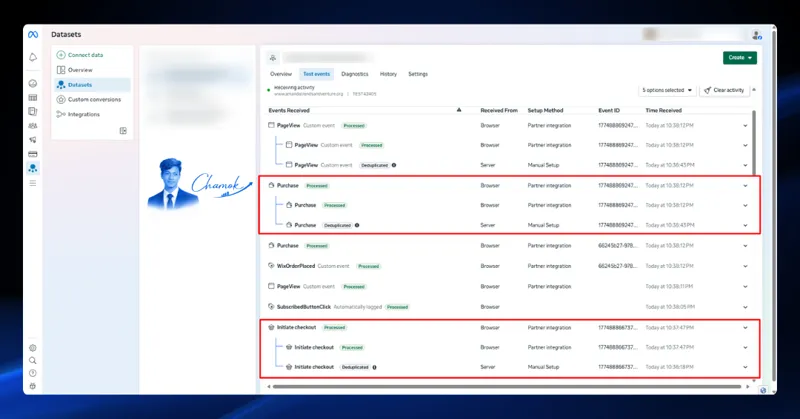
Wix doesn't let you run your own server code next to the site, so server-side tracking runs in a separate server GTM container on Stape or Google Cloud, on a subdomain of your own domain. Browser events are forwarded there and sent to Meta CAPI with the same event ID as the Pixel, so Meta keeps one copy of each.
For developers using Velo, Wix's backend order events can also send a server copy of each order, which helps when the thank-you page doesn't load in the browser.
A server-side Meta tracking build for a Wix store, sending every funnel event through the Conversions API on a custom tracking subdomain and deduplicating it against Wix's browser Pixel.
Meta Pixel
Conversions API
GA4 eCommerce
Read case study
FAQ
Wix tracking FAQ
How do I add Google Tag Manager to Wix?
Connect it from Marketing Integrations in the Wix dashboard by entering your GTM container ID. Wix recommends this over pasting the snippet into Custom Code. Custom Code and connected integrations generally need a premium plan with a connected domain.
Why are my Wix purchases counted twice in Meta or Google Ads?
Usually because the same pixel or conversion tag is installed twice, once through Wix's built-in integration and once through GTM or Custom Code. Pick one sender per event and remove the other, then test a new order.
Does Wix support Meta Conversions API?
Wix's Meta integration can send some server events, but with limited control over parameters and matching. For full control I run server-side GTM on a custom subdomain and send CAPI events with a shared event ID, so they deduplicate against the browser Pixel.
Can I track Wix Stores purchases in GA4 with revenue?
Yes. Either use Wix's GA4 integration, or connect GTM and remap Wix's store events to GA4's purchase event with order ID, value and items. Using both at once creates duplicate purchases.
How do I track Wix Forms submissions as conversions?
Track the successful submission, not the button click. When GTM is connected I use the form event Wix exposes or the success message state, then send it to GA4, Google Ads and Meta as a lead.
What server-side tracking really is, how server-side GTM works, what it fixes and what it does not, and a checklist to decide if your business needs it.
The step-by-step checklist I use to set up GA4 ecommerce tracking: events, data layer, GTM tags and testing, so product and revenue reports are accurate.