Setting up the Meta Conversion API sounds technical, but on Shopify and WooCommerce the hard part is not sending events. The hard part is choosing one method, configuring it so browser and server events deduplicate, and not accidentally running two integrations that both claim the same Pixel.
I set up Meta tracking for ecommerce stores on both platforms, mostly Bangladeshi fashion, food and wellness brands. This guide walks through the options I actually use, how to pick between them and how to test the result. Menus and setting names change often on both platforms, so treat the paths below as a guide and look for the closest match in your admin.
What do you need before setting up Meta CAPI?
Before setting up the Meta Conversions API (CAPI), you need admin access to your store, a Meta Business portfolio, a Pixel (Meta calls it a dataset in newer Events Manager screens), and ideally a verified domain in Business Settings. Check these first:
- You know which Pixel is the "real" one. Many stores have two or three from old agencies.
- You have removed old Pixel code pasted into the theme, so only one integration owns the Pixel.
- Your checkout collects email and phone, because those are the most valuable matching parameters.
- You have decided what counts as a purchase. For cash on delivery (COD) stores, that might be order placed or order confirmed.
If you are still unsure why you need both browser and server events, read Meta Pixel vs Conversion API first.
How do you set up Meta Conversion API on Shopify?
The simplest way to set up Meta CAPI on Shopify is Shopify's native Facebook & Instagram sales channel, with customer data sharing set to its highest level. For most small and mid-sized stores, this is where I start.
Option 1: Shopify's Facebook & Instagram channel
- Install the Facebook & Instagram app from the Shopify App Store and connect your Meta Business portfolio, ad account, Page and Pixel.
- Open the channel's data sharing settings. The app has generally offered levels such as Standard, Enhanced and Maximum. The highest level adds server-side events through the Conversions API on top of the browser Pixel.
- Confirm the correct Pixel is selected, then save.
- In Shopify, go to Settings > Customer events and check that the Facebook & Instagram app pixel is connected.
- Place a test order and confirm events in Meta Events Manager.
The native channel handles event IDs between its own browser and server events, so deduplication is built in. The trade-off is control: you get the standard ecommerce events, but limited ability to add custom events, change when a purchase fires or enrich data.
Option 2: Customer Events plus server-side GTM
When a store needs custom events (like a WhatsApp click) or wants one tracking stack for Meta, GA4 and Google Ads, I use Shopify Customer Events with server-side Google Tag Manager (sGTM).
Shopify Customer Events lets you add custom pixels that run in a sandbox and subscribe to standard events such as product_viewed, product_added_to_cart, checkout_started and checkout_completed. Shopify's checkout extensibility upgrade retired the old "additional scripts" box on the thank-you and order status pages, so Customer Events (or an app pixel) is now the supported way to track checkout.
A typical flow:
- A custom pixel or an app (Stape offers a Shopify app for this) captures Shopify events and sends them to your sGTM container on a custom subdomain such as
track.yourstore.com. - The server container runs a Meta Conversions API tag that sends each event with hashed customer data,
_fbp,_fbc, IP address and user agent. - The browser Pixel sends the same events with the same
eventID.
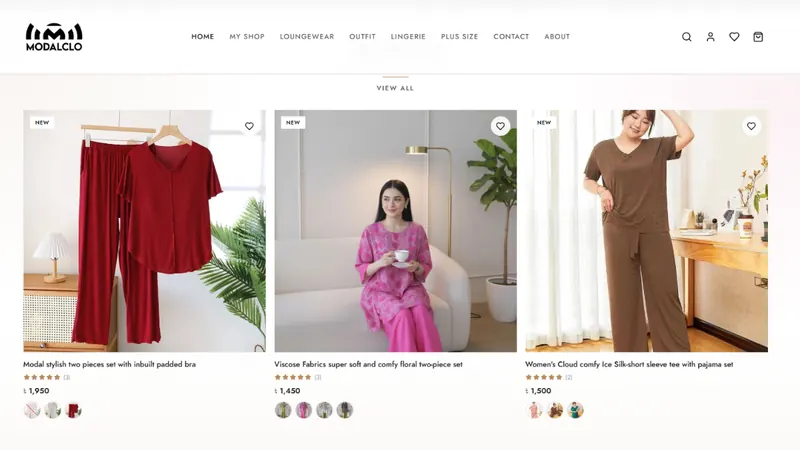
On my Modalclo Shopify project, I used GTM and Stape to replace a browser-only Pixel with deduplicated Pixel and Conversions API events, plus GA4 enhanced ecommerce mapped to Shopify product and checkout data.
Important: if you use this route, do not also leave the native channel sending server events to the same Pixel. The two integrations generate different event IDs, so Meta cannot match them and purchases get counted twice.
How do you set up Meta Conversion API on WooCommerce?
On WooCommerce, you have three practical options: the official Meta plugin for WooCommerce, server-side GTM (often hosted on Stape), or Meta's Conversions API Gateway.
Option 1: The official Meta plugin for WooCommerce
The official Meta plugin for WooCommerce (listed as Facebook for WooCommerce or Meta for WooCommerce, depending on where you find it) connects your store to Meta, syncs your product catalog and sends Pixel and Conversions API events. Setup is usually:
- Install the plugin from Plugins > Add New in WordPress.
- Open its settings and connect your Meta Business portfolio, Pixel and catalog.
- Make sure Conversions API or server-side events are enabled in the plugin's connection settings.
- Remove any other plugin or theme code that also fires the same Pixel.
- Test with a real order.
It is free and quick. The downsides are limited customization, occasional conflicts with caching plugins and themes, and less control over exactly which order status triggers a purchase.
Option 2: Server-side GTM with Stape
For stores that need full control, I use a WordPress data layer plugin (such as GTM4WP or Stape's own plugin) to push ecommerce events into GTM, forward them to a server container on Stape and send them to Meta from there. You can also send purchases from WooCommerce order data on the server, which helps when a payment gateway redirect means the customer never lands on the thank-you page.
I used this route on the Tea of Sylhet WooCommerce project: a GTM server container on Stape with a custom tracking domain, server-side events with hashed email, phone, IP and user agent matching, and synced event_id values between Pixel and CAPI to prevent duplicate purchases.
Option 3: Conversions API Gateway
Conversions API Gateway (CAPIG) is Meta's own option. It runs in a cloud environment you control (such as your AWS account) or through a managed hosting partner, and it mirrors the events your Pixel already sends to the server side, with deduplication handled for you. It needs little ongoing maintenance, but because it relies on Pixel events, it cannot send backend-only events such as an order confirmed by phone a day later.
Which Meta CAPI method should you choose?
The right method depends on how much control you need and how much setup you can support. Here is how I usually decide:
| Method | Platform | Effort | Control | Best for |
|---|---|---|---|---|
| Facebook & Instagram channel | Shopify | Low | Low | Standard stores that need reliable basics |
| Official Meta plugin | WooCommerce | Low | Low | Small stores, quick start |
| Server-side GTM (Stape or Google Cloud) | Both | High | High | Custom events, multi-platform tracking, COD logic |
| Conversions API Gateway | Mainly WooCommerce and custom sites | Medium | Medium | Low-maintenance server events mirroring the Pixel |
If you run Google Ads too, server-side GTM has the extra benefit of feeding GA4 and Google Ads from the same container. My explainer on server-side tracking covers that bigger picture.
How do you test your Meta CAPI setup?
You test a CAPI setup by sending real events and confirming in Events Manager that each one arrives from both browser and server and is deduplicated. My checklist:
- Use the Test Events tool in Events Manager and walk through product view, add to cart, checkout and purchase.
- Confirm each event shows both a browser and a server connection method.
- Check that purchase
valueandcurrencymatch the order. - Look at the event's deduplication details and Event Match Quality after real traffic arrives.
- Compare a week of Meta purchases with actual orders in Shopify or WooCommerce.
- Resolve any warnings in the Diagnostics tab.
Meta's event deduplication rules trip up a lot of stores; I break them down in event deduplication in Meta CAPI.
Final thoughts
Start with the simplest method that meets your needs, and make sure only one integration owns each Pixel. Move to server-side GTM when you need custom events, COD logic or one stack for Meta and Google. If you want a second pair of eyes, my advanced conversion tracking service covers Shopify and WooCommerce setups, and you can book a free tracking audit.